





In recent years, artificial intelligence has transformed the way we edit images, making complex manipulations accessible to everyone. One of the most exciting breakthroughs in this space is DragGAN, an innovative tool that allows users to edit images simply by dragging points on them. Unlike traditional photo editing software that requires advanced skills, DragGAN introduces an intuitive, interactive way to reshape and transform images with remarkable precision.
In this guide, you’ll learn everything you need to know about using the DragGAN AI editing tool—from understanding how it works to creating stunning image edits step by step.
What Is DragGAN AI Editing Tool?
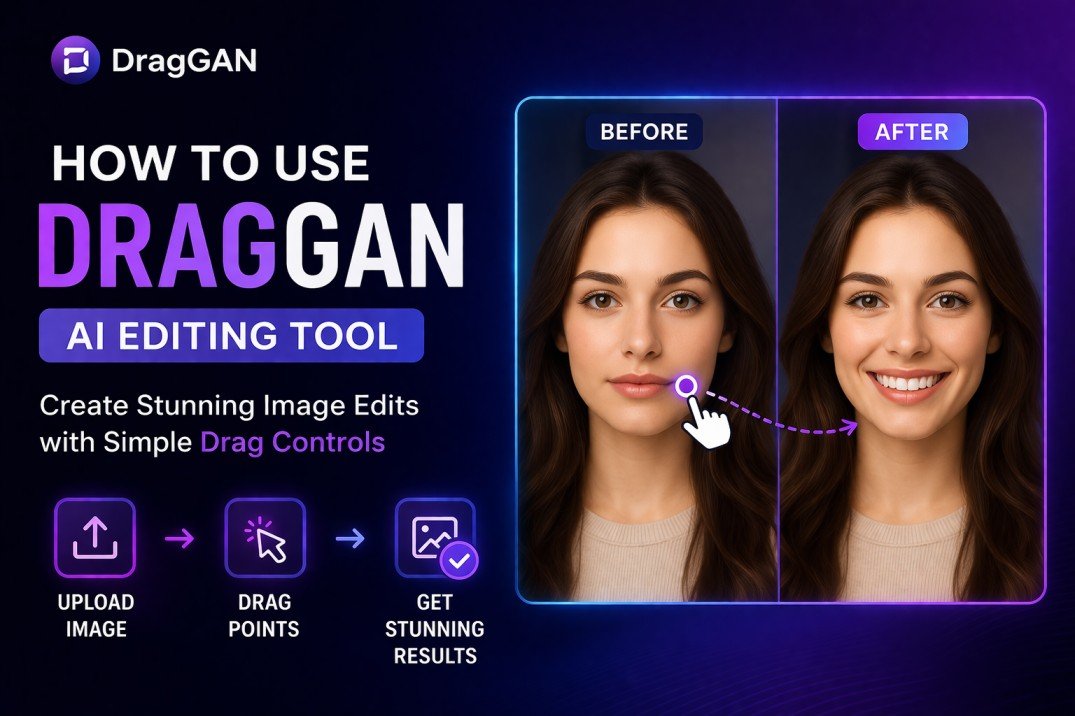
DragGAN (short for Drag-based Generative Adversarial Network) is a cutting-edge AI system designed to give users direct control over image manipulation. Developed using advanced deep learning techniques, it allows you to click on specific parts of an image and drag them to a new position—while the AI automatically adjusts the rest of the image realistically.
For example, you can:
- Change facial expressions (like turning a neutral face into a smile)
- Adjust the position of objects
- Modify body posture
- Reshape landscapes or backgrounds
What makes DragGAN unique is its ability to maintain photorealism even after significant edits—something that traditionally required hours of manual work in tools like Adobe Photoshop.
How DragGAN Works (Simple Explanation)
At its core, DragGAN uses a combination of:
- Generative Adversarial Networks (GANs)
- Feature tracking
- Real-time optimization
Instead of editing pixels manually, DragGAN understands the structure of an image. When you drag a point, the AI:
- Identifies the object or feature
- Tracks how it should move naturally
- Adjusts surrounding pixels to maintain realism
This makes editing feel more like sculpting than traditional photo manipulation.
Key Features of DragGAN
1. Point-and-Drag Editing
You simply select a point on the image and drag it to where you want it to go. The AI handles everything else.
2. Realistic Transformations
Even large edits (like changing head direction) look natural and consistent.
3. No Advanced Skills Required
Beginners can achieve professional-quality edits without mastering complex tools.
4. Versatility
DragGAN works across:
- Portraits
- Animals
- Objects
- Landscapes
5. Interactive Workflow
Edits happen in real time, allowing you to experiment freely.
Step-by-Step Guide: How to Use DragGAN
Step 1: Access the Tool
Currently, DragGAN is mainly available as a research demo or through experimental setups. You may need:
- A local installation (via GitHub)
- Or access to an online demo (if available)
Make sure your system meets the requirements (GPU recommended for smooth performance).
Step 2: Upload Your Image
Choose a high-quality image for best results. DragGAN performs better when:
- The subject is clear
- The image has good lighting
- The resolution is decent
Step 3: Select Control Points
Click on the part of the image you want to edit. For example:
- Eyes or mouth for facial edits
- Wheels for vehicles
- Edges of objects
These points act as anchors for your changes.
Step 4: Drag to Desired Position
Now, drag the selected point to where you want it to move.
Example edits:
- Lift a person’s smile
- Turn a face slightly to the side
- Stretch or shrink an object
Step 5: Let AI Adjust the Image
DragGAN will automatically:
- Adjust textures
- Maintain proportions
- Preserve lighting and shadows
This happens almost instantly, depending on your hardware.
Step 6: Refine and Repeat
You can:
- Add more control points
- Make additional adjustments
- Fine-tune details
The iterative process helps you achieve precise results.
Step 7: Export Your Final Image
Once satisfied, export the edited image in your desired format.
Tips for Stunning Results
Use High-Quality Images
Better input = better output. Avoid blurry or low-resolution images.
Start with Small Adjustments
Large changes can sometimes distort the image. Gradually refine your edits.
Add Multiple Control Points
For complex edits, use multiple points to guide the AI more accurately.
Focus on Natural Movements
Think about how objects move in real life—this helps maintain realism.
Experiment Freely
DragGAN encourages creativity. Try different edits to explore its capabilities.
DragGAN vs Traditional Editing Tools
| Feature | DragGAN | Traditional Tools |
|---|---|---|
| Ease of Use | Very easy | Requires skill |
| Editing Method | Drag-based | Manual tools |
| Speed | Fast | Time-consuming |
| Realism | High | Depends on user skill |
| Learning Curve | Low | High |
While tools like Adobe Photoshop still offer more control for professionals, DragGAN is ideal for quick, intuitive edits.
Use Cases of DragGAN
1. Portrait Editing
- Change facial expressions
- Adjust head position
- Improve symmetry
2. Product Photography
- Modify angles
- Improve composition
- Adjust shapes
3. Creative Design
- Create surreal effects
- Experiment with visual ideas
4. Content Creation
Perfect for:
- Bloggers
- Social media creators
- Digital marketers
Limitations of DragGAN
While powerful, DragGAN isn’t perfect:
- Limited public availability (still evolving)
- Requires decent hardware for best performance
- Complex edits may need multiple attempts
- Not a full replacement for professional tools yet
The Future of AI Image Editing
DragGAN represents a shift toward more interactive and intelligent editing tools. As AI continues to evolve, we can expect:
- More accessible versions
- Integration into mainstream software
- Even more realistic transformations
Tools like DragGAN could soon become standard in creative workflows, reducing the need for manual editing skills.
Conclusion
The DragGAN AI editing tool is redefining how we approach image manipulation. By replacing complex manual processes with simple drag-based interactions, it empowers both beginners and professionals to create stunning edits effortlessly.
Whether you’re enhancing portraits, experimenting with creative visuals, or simply exploring AI-powered tools, DragGAN offers a glimpse into the future of image editing.
If you’re looking to produce high-quality edits with minimal effort, now is the perfect time to explore what DragGAN can do.